
How SwoleX works
The workout app that executes
Log your training. Share it to a feed. Watch your friends try it — with weights Kevin already scaled for them.
Meet Kevin
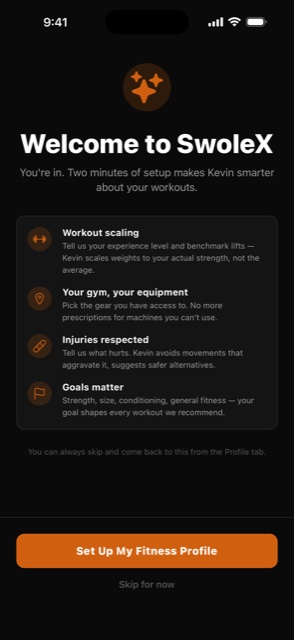
Two minutes of setup makes Kevin smarter
Kevin is the AI strength coach inside SwoleX. He's not a chatbot — he builds your workouts, grades your training week with a weekly analysis, and runs on TrueLoad™: the strength engine that turns every prescription into the exact weight you should be lifting.
The first time you open SwoleX, Kevin asks for a few signals so he can program for you specifically, not the average lifter:
- Workout scaling. Your experience level and benchmark lifts — Kevin scales weights to your actual strength, not the average.
- Your gym, your equipment. Pick the gear you have access to. No more prescriptions for machines you can't use.
- Injuries respected. Tell us what hurts. Kevin avoids movements that aggravate it, suggests safer alternatives.
- Goals matter. Strength, size, conditioning, general fitness — your goal shapes every workout he recommends.
You can skip the whole thing and start logging immediately. Kevin learns from what you actually lift either way.
Home screen
Two widgets, so the app is already open before you open it
Calories. Today's ring against your target, with three one-tap buttons that open Log Food straight into typing, speaking, or scanning a barcode — not all three into the same screen. It refreshes the moment you log, without opening the app.
Next Workout. Your programmed day as a poster, cover art and all, with START right on it. Switch programs in the app and the widget follows.
Small, medium and large. Dark by design, so they read on any wallpaper.
The feed
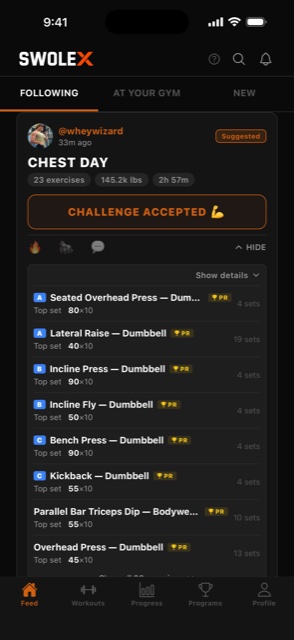
Every workout in your feed is a workout you can run
Other apps post workout stats. SwoleX posts workouts. Every card on your feed has a button — CHALLENGE ACCEPTED, LET'S GOOOOO, or TAP TO DO THIS WORKOUT — and tapping it loads the whole session with the weights already scaled to you.
Tap SETS to expand the full plate-by-plate breakdown before you commit. Bench Press: 135 × 10, 225 × 10, 225 × 10, 275 × 6, 275 × 5, 135 × 30. You see exactly what you're signing up for.
This is the difference between SwoleX and every other lifting app. Strong is a tracker. Hevy is a tracker with a feed. SwoleX is a tracker with a feed where every post is executable.
Live Workouts — new
Lift together, in real time
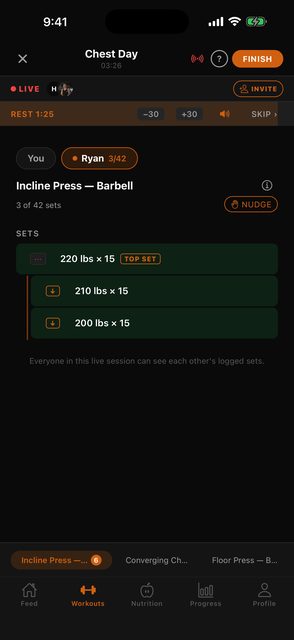
Any workout can go live — one Kevin built, one you built set-by-set, it doesn't matter. Tap Lift with a friend on the workout screen, pick your crew, and you're leading a live session.
Friends get a push notification. One tap and they're inside your workout — with every weight already re-scaled to their strength by TrueLoad™. When you add an exercise or another set mid-session, it shows up on their screen within seconds.
Everybody logs their own numbers, at their own pace, at their own gym. Your 225 bench is their 185 — same workout, honest loads. When you wrap up, nobody's session gets cut short; everyone finishes and saves on their own time.
Live Workouts is free on every plan — because lifting with your friends shouldn't be a paywall.
When you wrap up
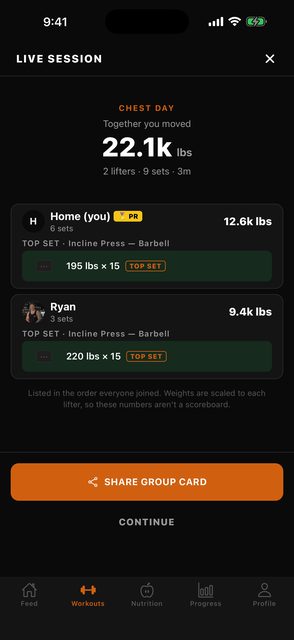
Together you moved 22.1k lbs
Finish a live session and you get a recap for the session, not just for you — the combined tonnage, every lifter, and each person's top set.
It is deliberately not a leaderboard. Weights are scaled to each lifter by TrueLoad™, so the numbers are not comparable and the recap says so out loud. Lifters are listed in the order they joined, not ranked.
One tap shares a group card crediting everyone who showed up, and the session posts to the feed once with every lifter named as a co-author — not as a duplicate post per person.
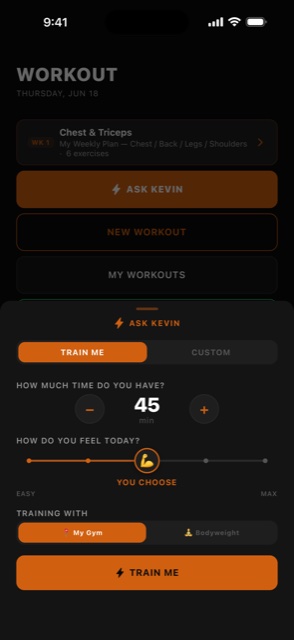
Train with Kevin
Tap TRAIN WITH KEVIN and he builds your session in seconds
Don't feel like programming today? Open the Workouts tab and tap TRAIN WITH KEVIN. On the TRAIN ME tab he asks three quick things:
- How much time do you have? Stepper from 15 to 120 minutes.
- How do you feel today? Five-point intensity slider from Easy to Max — or let Kevin choose based on your recent training load.
- Training with? My Gym (the equipment you marked) or Bodyweight only.
Kevin pulls in your training history, your goal, your strength baselines, and your gym's equipment, then writes the session — exercises, sets, reps, weights rounded to your real plate math, rest times, set type (normal / superset / drop), and a one-line coaching cue per exercise.
You can read the plan, swap anything you don't like, then tap START WORKOUT. Walk to the rack.
Ask Kevin — new
Argue with your coach. He has read every set you have logged.
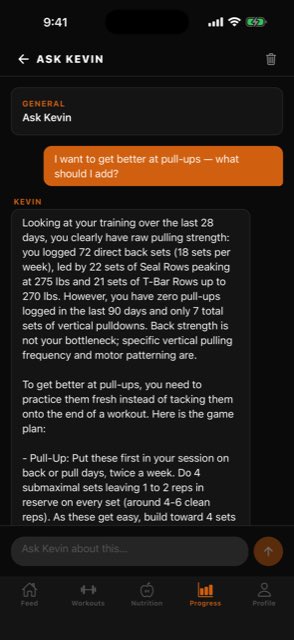
Kevin has been reading your training log all along. Now you can ask him about it. Open the Progress tab, tap ASK KEVIN, and type the thing you actually want to know:
- “Why has my incline bench gone backwards?”
- “I want to get better at pull-ups.”
- “My back day turns into an arm day by the end.”
He looks it up before he answers. Your real sets on the lift, your weekly work per muscle group, what you have logged to eat, your weigh-ins, and the equipment at the gym you actually train at. Every answer names the numbers behind it — dates, loads, sets per week, where it sat in the session. If you have not logged something, he says so and tells you what to start tracking, instead of guessing.
And he can build the fix. When the problem is the shape of a whole day rather than one exercise, Kevin writes that session while he is explaining it. It appears under his reply a few seconds later, ready to review and start, and it is saved to Kevin's Picks so you can run it again.
You can also ask from a stalled lift on your weekly report, or from any exercise's history — Kevin opens already knowing which lift you mean.
Ask Kevin is part of SwoleX Pro.
Supersets
Pairs you can actually run without crossing the gym
A superset is only useful if both movements are somewhere you can stand. That sounds obvious; it is the part software usually gets wrong.
So SwoleX does not invent pairs on the fly. There is a library of 110 checked pairs, each one labelled by what kind of pairing it is — opposing muscles, compound then isolation, same muscle group — with the rounds and rest already laid out and the whole list filtered to your gym's equipment.
Pick one in the exercise picker, or let Kevin choose from the same list when he builds your session. Either way the pair is one you can run back to back, because that is a property of the pair rather than something we hoped for.
The week ahead
Ask for a week, not just a workout
Kevin will lay out a whole training week, not only the next session.
It also layers. If you are already running a program, the weekly builder stays available and works around it — it sees which muscles the program already covers and steers the week elsewhere, so two glute days from a program and three days of Kevin read as one coherent week instead of a collision.
What it deliberately does not do is guess your schedule. Nothing in SwoleX pretends to know which days you train, so the week is shaped by what your body has already been asked to do, not by a calendar we invented for you.
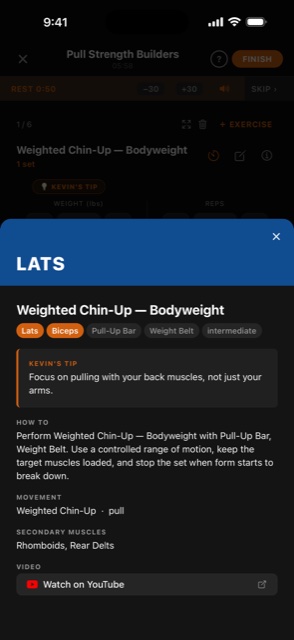
In every exercise
Kevin's tip, the muscles worked, the form video
Tap the ⓘ icon on any exercise during a workout and you get the whole picture:
- Primary muscle (LATS, CHEST, QUADS, etc.) and secondary muscles affected
- Equipment required and difficulty level
- Kevin's Tip — a single, specific form cue for that movement
- A plain-English HOW TO walkthrough
- A linked YouTube video for the full form demo
The catalog is 554 hand-curated movement variants across 376 movements — and 551 of them ship with a form video. No hallucinated exercises. No guesswork.
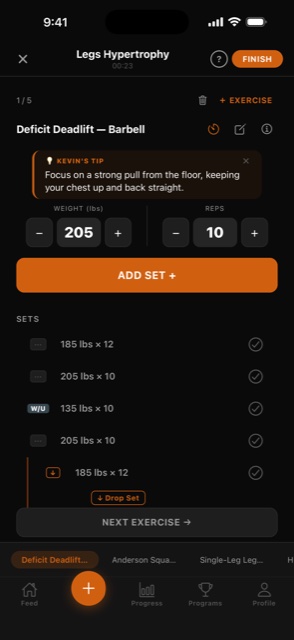
Logging
Log every set. Land every PR in real time.
SwoleX is designed for the gym, not the desk. Big steppers for sweaty hands. Kevin's form tip is right above the steppers on every exercise — you don't have to dig into a menu mid-set to remember the cue.
Edits autosave when you move on — no "X / SAVE" tap dance. Swipe left on any set row to delete it. Drop sets and supersets are first-class set types, not afterthoughts, and the inline indicator shows you which row is a drop. A tab strip across the bottom lets you jump between today's exercises without losing your place.
The moment you log a heavier set than your previous best, a PR badge lands in gold next to that set. Workouts persist through app crashes and lock screens — walk away mid-set, come back, the session's still there.
Bodyweight work counts. Dips, pull-ups and push-ups add to your volume — your own weight included at a share that fits the movement, so a bar dip and a bench dip aren't valued the same. It shows as its own figure beside your loaded volume rather than being quietly mixed in.
On anything that takes a belt or a vest, the weight field says ADDED and reads +45 × 10 — the plate, never the total, so it can't be mistaken for a barbell number. On movements that can't take load, the field stays out of your way entirely.
Earn it
SwoleX celebrates the right things
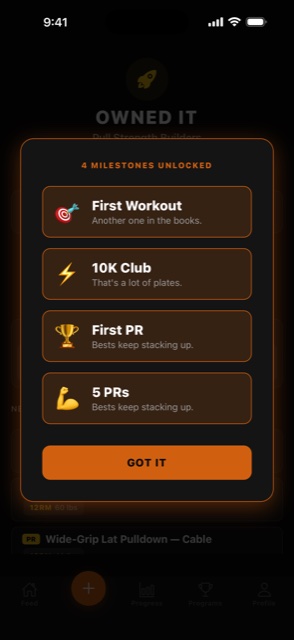
Finish a workout and SwoleX runs the numbers. First workout ever? Milestone. First ten-thousand-pound day? Milestone. First PR? Milestone. Five PRs in one session? Milestone.
They land in batches — the "OWNED IT" screen unlocks all of them at once and lets you screenshot, share, or move on. Gamification that earns its keep instead of begging for engagement.
How did it feel?
Kevin gets sharper every time you finish a workout
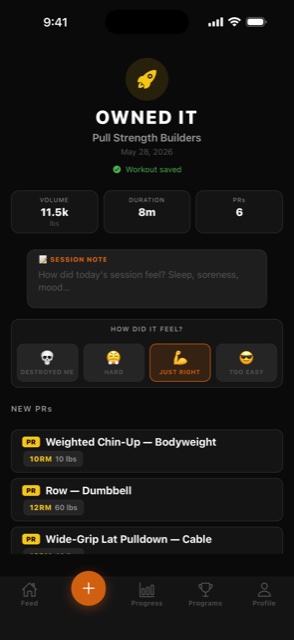
After every Kevin-built session, the review screen asks one question: How did it feel?
- DESTROYED ME — too hard. Kevin trims volume or intensity next time.
- HARD — appropriate stress. Kevin holds the line.
- JUST RIGHT — the sweet spot. Kevin pushes weight or volume.
- TOO EASY — under-loaded. Kevin steps it up.
That single tap feeds back into a per-exercise adjustment factor Kevin reads on the next build. Over a few weeks, his sessions track to where you actually are.
Your style
Kevin builds the way you actually lift
Kevin has a default idea of how a session should be shaped. If yours is different, he uses yours.
If your working sets climb and then back off, if you carry more volume on accessories than he would, if you always finish a compound with a high-rep set — sessions start coming back looking like that. He reads it out of what you have already logged.
There is nothing to fill in and no toggle to find. Calibration learns how heavy; this learns what shape.
The weekly read
A report that describes your training before it grades it
Progress → KEVIN → Analyze My Training. Pick a window and a scope, and Kevin writes up the block.
It opens with your training style, in his words — then what's working, with the evidence, before anything that needs attention. The grade comes after, and it names the thing it was earned on rather than landing as a mood.
What it will not do is mark you down for training in a way that doesn't match a template. Ramping to a heavy triple and then stripping weight for a set of twenty is deliberate programming, and it reads as deliberate programming. A set taken to failure is not an overshot rep target. There is no adherence score — REP INTENT simply tells you which rep ranges your working sets actually landed in.
Calibration reads your heaviest working set, not the session average, so warm-ups and back-off sets never make you look like you're under-loading. Export the whole thing as a PDF.
Body
Track the drift. See cuts and bulks on one timeline.
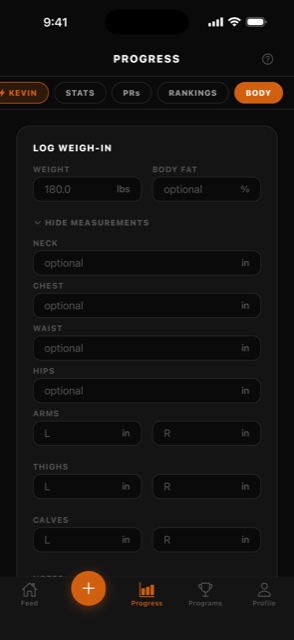
Open Progress → Body and log a weigh-in. Bodyweight, body-fat percentage, and seven circumferences — neck, chest, waist, hips, arms, thighs, calves. Whatever you measure, SwoleX charts.
The trend chart overlays your bodyweight against any single measurement so you can read the drift across cuts and bulks on one timeline. Lean phase dropping the waist faster than the bodyweight? Body recomp working? The chart shows the answer in two taps.
Body data feeds back into Kevin's read of where you are — heavier baseline lifts make more sense in context, and Kevin reads your current bodyweight on every build so push-up and pull-up reps scale to what you're actually moving.
Nutrition
Pick a diet style. SwoleX does the macro math.
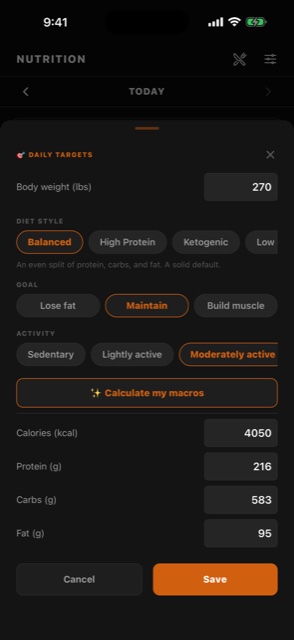
Open Nutrition → Daily Targets, pick a diet style — Balanced, High Protein, Keto, Low Carb, Mediterranean, Endurance, or Zone — add your goal and activity level, and tap Calculate my macros. Calories, protein, carbs, and fat are set for you.
The split is real, not a slider. Keto pins carbs at a fixed ceiling and puts the rest in fat. Endurance loads carbs for the work. A marathoner and a bodybuilder at the same bodyweight get genuinely different targets — that's the whole point of choosing a style.
Then log against it however you like: search the library, scan a barcode, or just describe the meal and let AI break down the macros. Every number you set can still be typed over by hand.
Meal plans
Tell Kevin what you actually eat. Get the week.
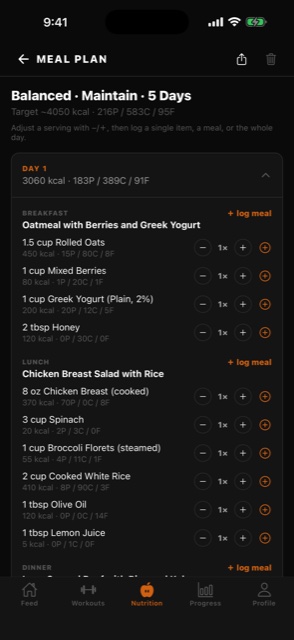
Kevin builds a multi-day plan around the macro targets you just set. Name the foods you actually eat, choose which meals to plan — even just dinner — and he fills in the rest with common supermarket staples, not obscure cuts you'd have to hunt for.
It's a guideline, not a cage. Every portion has a stepper, so if you want two eggs instead of four you change it in place and the totals follow. Log a single item, a whole meal, or the entire day.
A PLAN tab in Log Food puts today's planned meals one tap from your food log, and any plan exports as a clean PDF you can print or share.
Grocery list
A shopping list in real quantities, not grams.
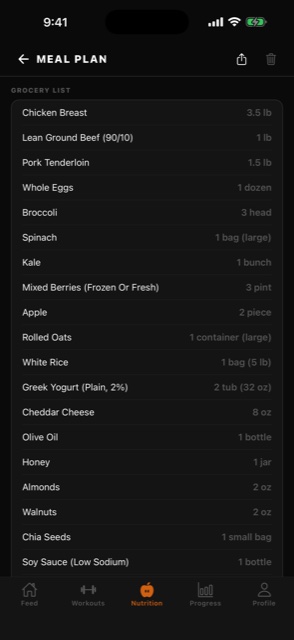
Every plan comes with the shopping list already aggregated across the days — and in the units a store actually sells. 1 dozen eggs. 3.5 lb chicken breast. A pint of berries. A bag of rice. Not “1,588 g chicken.”
That sounds small until you've tried shopping off a plan that lists raw gram totals. Items are grouped by category, so you walk the store once instead of doubling back.
The list exports in the same PDF as the plan, so you can print the week and stick it on the fridge.
Share
Auto-generated. Story-ready. Deep-linked back to the workout.
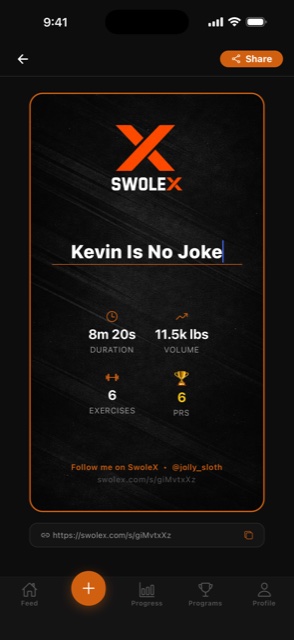
Every completed workout produces a branded 9:16 share card — black background, SWOLEX wordmark, the workout title you gave it, the stats grid (duration · volume · exercises · PRs), and a shortcode URL that deep-links back to the original workout.
One tap to Instagram Story. One tap to TikTok. One tap to Snapchat. One tap to copy the link.
Anyone who taps the link in your story gets dropped into the workout in their SwoleX app — already scaled to their strength, ready to start.
Equipment-aware
Kevin already knows what's at your gym
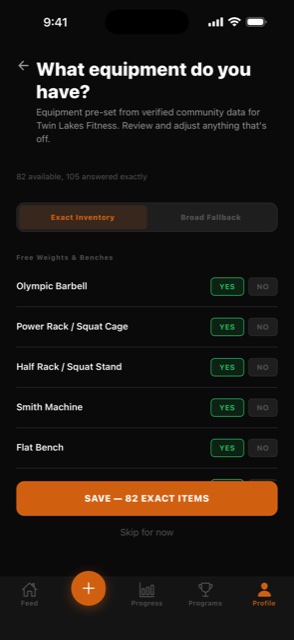
Search your zip code. SwoleX pulls every gym within five miles and pre-fills its equipment from verified community data. Twin Lakes Fitness, for example, ships with 82 exact items already on file — Olympic Barbell, Power Rack, Smith Machine, every cable attachment, every machine.
Review the list and toggle anything that's off. Kevin reads every one of those items on every workout build. He won't suggest a Smith machine if your gym doesn't have one. He won't prescribe a cable fly if there are no cables.
You can add multiple gyms (commercial + home + travel) and Kevin generates appropriately for each one.
Ready?
Log it. Share it. Watch them try it.
SwoleX is free. Pro is $9.99/mo — that unlocks unlimited Kevin and the weekly training analysis. Cancel any time.